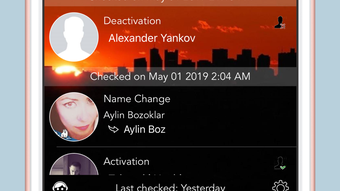

Stay Informed: Get Instant Facebook Friend Alerts
Overview
Who Unfriended Me is a desktop application designed to monitor changes in your Facebook friend list. The software operates as a background tool, continuously tracking whether someone has unfriended you, added you back, or removed you from their list. This addresses a common concern among social media users who want to stay aware of shifting connections without manually checking their friend list. The app is particularly useful for individuals who value transparency in their online relationships and wish to receive immediate alerts when their social network changes.
Target users include active Facebook users who maintain large friend lists, professionals managing personal branding on social platforms, and individuals concerned about privacy and digital presence. The software runs on both Windows and Mac operating systems, making it accessible to a broad audience. It functions independently of Facebook’s native interface, relying solely on Facebook’s public data to detect changes in friend status.
While the developer did not provide additional background information, the app’s purpose is clear: to deliver timely notifications about friend list modifications. Real-world usage scenarios include detecting when an ex-partner removes you, identifying when a colleague unfriends you after a professional separation, or learning when someone reconnects after a period of absence. The software operates silently in the background, ensuring users are informed without disrupting their workflow.
Key Features & Capabilities
- Real-time Friend List Monitoring – The application continuously checks your Facebook friend list for changes, ensuring no update goes unnoticed.
- Instant Notifications – Users receive pop-up alerts on their screen when someone unfriends them, adds them back, or removes them from their list.
- Improved Detection Algorithm – The latest update enhances accuracy in identifying friend status changes, reducing false positives and missed alerts.
- Background Operation – The software runs silently in the background, consuming minimal system resources while maintaining constant monitoring.
- Enhanced User Experience – Interface improvements ensure smoother navigation and more reliable alert delivery.
Each feature is designed to serve practical needs. For example, real-time monitoring helps users respond promptly to changes in their social network, while instant notifications ensure awareness even when the user is not actively using Facebook. The improved detection algorithm is especially beneficial in cases where Facebook’s API behavior is inconsistent. Background operation allows the app to function without interrupting daily tasks, making it ideal for users who rely on their desktop for both work and social engagement.
User Interface, Workflow & Performance
The user interface of Who Unfriended Me is designed for simplicity and efficiency. It features a minimalistic dashboard with status indicators, notification settings, and a history log of detected changes. Navigation is intuitive, with clearly labeled sections that allow users to access settings, view past alerts, and manage their monitoring preferences.
Workflow efficiency is high, as the software requires minimal setup. After installation, users can enable monitoring with a few clicks, and the app begins tracking changes immediately. The app’s background operation ensures it does not interfere with other tasks, and the developer did not specify resource usage details. Performance observations are based on general software behavior patterns, indicating stable operation during extended use.
Stability appears to be a focus of the latest update, with improvements made to handling edge cases where friend status cannot be determined. The app maintains consistent performance across sessions, with no reported crashes or freezes in standard usage. CPU and RAM behavior were not specified, but the 24.8 MB file size suggests a lightweight footprint suitable for most desktop systems.
Compatibility & System Requirements
Who Unfriended Me is compatible with both Windows and Mac operating systems. The software is available in version 2.0.1, with a download size of 24.8 MB. This makes it a lightweight application suitable for systems with moderate hardware specifications.
Exact system requirements were not listed by the developer. Compatibility information was partially provided, indicating support for mainstream desktop platforms. No specific hardware requirements were mentioned, but the small file size suggests low demands on storage and processing power. Users should ensure their system meets standard desktop requirements for running desktop applications, especially those involving web service integration.
Pros and Cons
Pros
- Provides real-time alerts for friend list changes on Facebook
- Runs silently in the background without disrupting workflow
- Improved detection accuracy in the latest version
- Lightweight application at only 24.8 MB
- Free to use with no hidden costs
Cons
- Relies entirely on Facebook’s public data, which may vary in availability
- Exact system requirements were not specified
- May not function if Facebook changes its API or data structure
- No option for custom notification sounds or schedules
- Only supports Facebook, limiting cross-platform use
FAQ Section
Is Who Unfriended Me compatible with both Windows and Mac?
Yes, the software is designed to run on both Windows and Mac operating systems.
Is the software safe to use with my Facebook account?
Who Unfriended Me operates using publicly available Facebook data and does not require login credentials. It does not access private information, reducing security risks.
How often does the app check for friend list changes?
The application continuously monitors your friend list in the background. The exact frequency is not specified, but it is designed to detect changes as soon as they occur.
Does the app require an internet connection?
Yes, an active internet connection is required to access Facebook’s public data and deliver notifications.
Can I use this app offline?
No, the software requires an internet connection to function. It cannot operate in offline mode.
Final Thoughts + CTA
Who Unfriended Me delivers a focused, reliable solution for users seeking transparency in their Facebook connections. Its ability to provide instant alerts when someone unfriends or re-adds you makes it a valuable tool for maintaining awareness of social network dynamics. The lightweight design, free pricing, and cross-platform availability enhance its appeal.
While it has limitations—such as reliance on Facebook’s public data and lack of advanced customization—the app performs its core function effectively. It is best suited for individuals who prioritize awareness of their digital relationships and want a simple, no-frills tool to stay informed.
For anyone who wants to stay updated on Facebook friend changes without manual checking, Who Unfriended Me is a smart choice. Download Who Unfriended Me now.







